Completing Forms
Depending on your district's settings, you can complete and submit forms, such as the Student Registration form, in Aspen Go (Student and Family portals).
To complete a form:
-
Log on to Aspen Go.
-
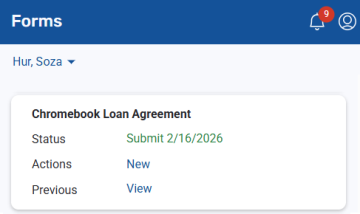
Tap Forms.
Note: If you are a parent and have more than more Aspen student, use the drop-down at the top of the screen to select the student you want to work with. The Forms screen lists the form(s) available for that student.
-
Tap New or Resume to open the form.
-
Follow the instructions to complete and submit the form.
Notes:
-
Click
 to exit the form and return to the Forms screen.
 -
You can view a form you submitted by tapping View.
-